你不知道的 console 小技巧

無聊翻書時看到的,筆記一下。

各種 log 的方式

1
2
3
console.info('testing');
console.error('I\'m a error');
console.warn('Warning');

主要是前面的 icon 不一樣,也能透過側邊攔來篩選訊息:

console

群組起來

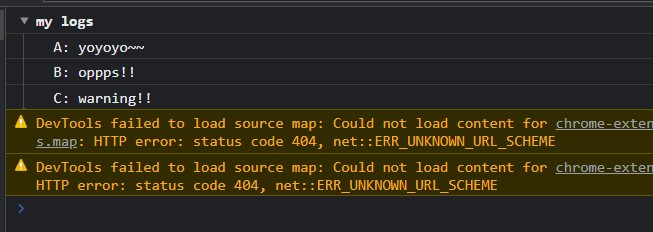
group 可以把東西群組起來:

1
2
3
4
5
6
console.group('my logs');
console.log('A: yoyoyo~~');
console.log('B: oppps!!');
console.log('C: warning!!');
// 到這邊結束
console.groupEnd();

group

用表格來呈現物件跟陣列

這個意外的很好用:

1
2
3
4
5
6
7
8
9
10
11
12
13
14
15
const people = [
{
name: 'PeaNu',
age: 20
},
{
name: 'PPB',
age: 22
},
{
name: 'Cris',
age: 30
}
];
console.table(people);

table

條件式的顯示 log

當第一個參數是 false 時就顯示後面的訊息:

1
console.assert(false, 'has a problem here');

所以可以這樣運用:

1
2
let n = 100;
console.assert(n < 10, 'n is bigger than 10');

assert

測時時間

當你想測試一段 code 的執行時間時可以用這招:

1
2
3
console.time();
const n = Math.random();
console.timeEnd();

輸出結果就會是:

1
default: 0.010009765625 ms
fetch 處理錯誤的方式 從 fetch 來認識 Promise
Your browser is out-of-date!

Update your browser to view this website correctly. Update my browser now

×